
Your next 10 hires won't be human
Put your busywork on AI. Nothing leaves your business until you tap OK
Kommit builds AI workflows for the jobs you keep redoing — quotes, follow-ups, reminders, intake, reports — inside the tools you already use. It checks with you before anything goes out.
- Four weekly build sessions
- 30 days of Kommit included
- Your OK before every send
- Yours to keep and change
$499 a seat · 30 days of Kommit included · starts October



 Google Calendar
 Google Sheets
 Square
 HubSpot
 Outlook
 Stripe
 Mailchimp
Why Kommit
Less admin. You stay in charge.

Drafts in your voice
Kommit drafts reminders and follow-ups in your voice. You read and approve each one.
Nothing sends without your OK
Kommit emails you before every message goes out. Approve it from your phone, or change it first.
Keep the tools you use
Kommit works inside the accounting, inbox, calendar, CRM, and payment tools you already pay for. Don't see yours? Let us know, and we'll add it.
No tech skills needed
Describe the chore in plain words. Kommit turns it into a workflow — we build the first one with you.
See what Kommit did
Every time a workflow runs, you can see what Kommit did and why. No digging through technical screens.
Hand off the repeat admin
Chasing, reminders, replies, recaps — the jobs that quietly eat your week stop landing on you.
How it works
Your workflows, built with our AI experts
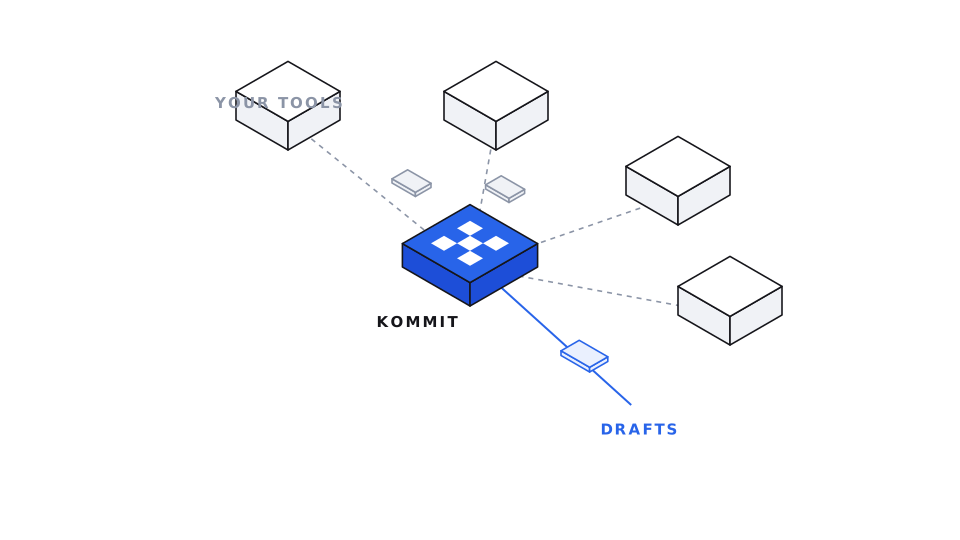
Kommit sits in the middle of the tools you already use — work flows in, drafts flow out, and you approve what sends.
Reserve your seat
Claim a seat and bring one chore you keep redoing. The cohort starts in October.
Four weeks, building as many as you want
Four weeks, one live session a week. Each one teaches a piece of AI, then you build with it — start with one job, keep going from there.
You approve every send
Whatever you build, Kommit emails you first. Approve the message, change it, or skip it.
Which one fits your work
Not every workflow belongs in a cohort
Both routes end with real workflows running in your own tools. They differ in what the work needs — and who does the building.
For the jobs one person does by hand — chasing invoices, reminding customers, replying to enquiries, collecting paperwork.
- You build them yourself, with us, over four weekly sessions
- Alongside other owners doing the same thing
- Your own tools, your own examples, running by the end
For work with specific requirements — compliance and audit obligations, bigger teams, a process that crosses several systems and departments.
- A consultant works alongside your team, start to finish
- Built to whatever your compliance and approval rules demand
- Handed over so your people can change it without calling us
FAQ
Questions before the first call
What does it cost?
A seat in the October cohort is $499, and that includes 30 days of Kommit — which runs out about a week after the cohort ends, so you get to use what you built before deciding anything. We'll email you a payment link with your confirmation. After the 30 days it's a paid subscription, and we'll tell you the price well before you have to decide.
What if it sends something wrong to a customer?
It can't send without you. Every message stops at an approval step — Kommit emails you the draft, and you approve it, edit it, or skip it. If you never reply, it waits. Nothing goes out on its own unless you deliberately take that step out.
What access does Kommit get to my accounts?
Only the tools a workflow needs, and only the permission that job needs — reading unpaid invoices does not grant permission to move money. You connect each tool yourself, and disconnecting it from your own account settings cuts Kommit off immediately.
Who can see my customer data, and do you train AI on it?
We do not use your data to train any model. It stays in the tools you already use — Kommit reads what a workflow needs at the moment it runs. We only look at your workspace when you ask us to help with something, and those times are recorded too.
What about security and compliance?
SOC 2 and ISO 27001 are both underway — we'll say plainly that they are in progress rather than imply a badge we don't hold yet. For EU customers we operate in line with GDPR, including EU data residency. Already in place today: an approval gate on every outbound action, a tamper-evident record of every run, and encryption in transit and at rest.
Who do I call when something breaks?
The people who built your workflow. Cohort members get a direct line to us rather than a ticket queue — you will know the name of the person who set your workflow up.
What happens if I want to stop?
Disconnect your tools and you are done — no notice period during the cohort. Your data lives in your own accounts, so nothing of yours is stuck here, and we hand over how each workflow was built so anyone could rebuild it.
Will my customers know a machine wrote it?
That is your call. Messages go out from your own address or number, in wording you approved, so they read like you. Kommit never claims to be a person, and it never sends anything you have not seen.
I'm not techy at all.
You do not need to be. We show you each step live and you follow along in plain English — no code, nothing to install. Questions get answered in the chat as we go, and every session ends with open Q&A. After that your job is reading a draft and tapping yes.
What tools does it work with?
QuickBooks, Gmail, Google Calendar, Square, HubSpot, Outlook, Slack, Stripe, Shopify, Xero, Notion, Salesforce and the rest of the catalog — see the full list on the integrations page. Don't see yours? Let us know, and we'll add it.
Browse all integrations →How fast can we be live?
Week one. Each session ends with something running in your own tools, so you leave the first one with a workflow rather than notes.
Hand off the repeat work. Keep the final say.
The October AI accelerator: 10 seats, starting Monday 5 October 2026. Four weeks, one live session a week, building the workflows you actually run on. Apply by September 30 at 10pm Eastern.
$499 a seat · 30 days of Kommit included · start automating the work you keep redoing.